Saturday, October 30, 2010

Check out these classes!

Chances are if you are reading my blog, you either scrapbook or you are a friend/family member who knows that I love to scrapbook and dabble in photography!  I also love to learn and reteach, in my own words, the valuable information I have acquired.  I have a site I want to share with you that ROCKS!  The classes are free as long as you watch them live.  Depending on your timezone and the time of the class, this could be fabulous or really bite!  The site is called CreativeLIVE.  They have classes on Photoshop, Photoshop Elements, Photography, Web Design, and they just did a class on pumpkin carving! Check out THIS 3 hour class that will talk about creating gifts for Christmas using your photography.  Or THIS 3 DAY class on Children's Portrait Photography, or THIS class on Photoshop Elements!

Do you have a favorite site or two where you have gained valuable knowledge about scrapbooking or photography?  Please share in the comments section!

Have a fabulous weekend, and thanks for stopping by!

Make sure and stop by next week as I have a handful of FREE items to give away!  These freebies will appeal to paper scrappers, digi scrappers, and Shutterfly fans!  You won't want to miss this!

Thursday, October 28, 2010

New products out at Mscraps and Free Digital Scrapbooking Items!


Mscraps is SO generous!  Look at this kit that is FREEEEEEEE!!!! (link under photo):
Link HERE

Mscraps has some new items out and they are on sale too!  Check these out:
Find HERE
Find HERE

Find HERE

Wednesday, October 27, 2010

Like Mother Like Daughter!

Morgan is taking her very own Digital Scrapbooking Class at Jessica Sprague's site called MyAwesome Life.  She LOVES this class!  She is learning keystrokes and Photoshop terms, along with making a book about herself!  To help her in her scrapbooking journey, this self-paced class provides her with a digital scrapbooking kit, templates, quickpages and instructional videos.  Here is one of the first pages she has completed:

She even cleaned her room so that she could complete this page! Woohoo!  I am very proud of her, but I think she is going to start interrupting my computer time!  :)

Tuesday, October 26, 2010

Template Tuesday - Free Digital Scrapbooking Template & Design Tips!

Happy Tuesday!  Thanks for stopping by!  Here is a peek at today's free digital template:
 Click HERE for link for free template (link expires in one week)
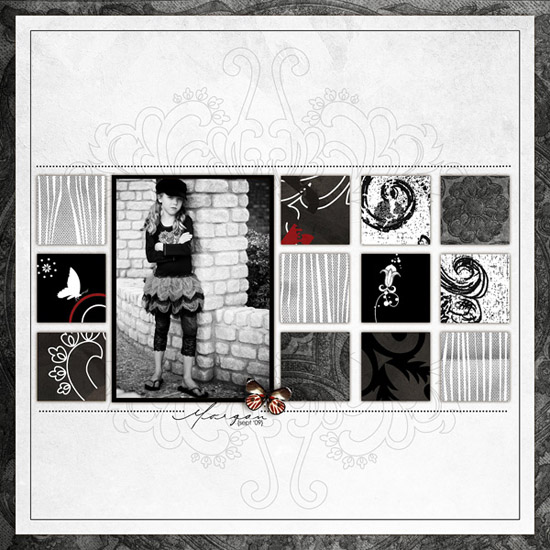
 Here is how I used the template:
I used United Kingdom by Honey Designs at Mscraps

So let's talk for a minute as to why this design works.
1. Visual Triangle: (the small splashes of red) Placing items on my scrapbook page in a triangle allows the viewer's eyes to see the page as a whole rather than being distracted by one or two pieces on the page.  A  visual triangle can be created on a scrapbook layout using photos, embellishments, or event text such as your title, date, and journaling.
2.  White Space:   White space is the areas of a layout that is has no text or graphics.  It gives the viewer's eye a chance to rest.
3.  Symmetry:  If I were to cut this page in half, I would have the same weight on the right as the left, and the same thing on the bottom as I do the top.  While symmetrical pages are predictable, they are also very solid and comfortable
4.  Repetition:  I repeated the colors black, white, gray, and red using a variety of patterned paper and elements with various textures.  I have also repeated the squares from the brick work in the photo.  Repetition creates visual consistency in page designs.  Be careful not to overuse repetition as it can get boring quickly!
5.  Unity:  Unity creates a feeling of wholeness.  The photo and papers are spatially connected to each other because of their proximity.  This placements gives a unified look to the layout.

To read more about design principles go HERE.

If you are new to digi scrapping, you are going to need some software to get started.  Go to www.adobe.com and download the FREE 30-day trail version of Photoshop Elements.  (For a direct link, click HERE )  There are instructions all over the web as to how to get started in digital scrapbooking.  You can click HERE for instructions too.  Click HERE to for instructions on how to use a template.

Thanks for stopping by and have a great week!

Monday, October 25, 2010

POTD (Photo of the Day)

I have to admit that doing the POTD project is a pain at times.  More than I once I have had to do some catching up on this project because life got in the way! Regardless of the mild burden POTD occasionally brings to my life, I am thankful I am doing it!  Here is last week's page:

I also work on the front cover every month.  I like to be able to have the whole book ready to print by January 1!  Here is what my front cover looks like so far.  I highlight a memory from each month with my favorite photo (there's one photo on here that I didn't take - Thanks, Mike T.!):
What is holding you back from doing a Photo of the Day project?
Thanks for stopping by!  Remember that tomorrow is Free Template Tuesday!

Saturday, October 23, 2010

Blessings

There are times when I like to sit back to watch and listen to my surroundings.  My house is always full of kid noise.  Fighting, laughing, singing, and whining are all common sounds found in my house on a daily basis.  Today I rediscovered just how great my kiddos are.  Nothing earth shattering happened.  I just remembered that I have a lot to be thankful for, including fabulous kids! 

Brie is unlocking the key to reading.  I watch in amazement as she uses her knowledge to decode the written word:

Morgan recently enrolled in a scrapbooking class.  Her first assignment was to to gather various photos of items important to her in her life.  I handed her my camera, with the proper settings in place, and encouraged her to fill the camera's frame with her subject and to look at her subjects from different angles.  This is one of her shots she took all by herself:
I overheard Tucker talking to Troy, a fabulous (adult) neighbor.  Tucker and Troy were talking college football stats like grown adults who think they can out-coach or out-ref the individuals they are watching on TV!  I was amazed at how much Tucker knew about so many teams.  I was tickled that he was holding an intelligent conversation with an adult too!
I am thankful for the blessing in my life.  I need to spend more time appreciating the gifts I have been given.  What blessings are in your life that you are currently taking for granted?
Have a great weekend and thanks for stopping by!

Tuesday, October 19, 2010

Template Tuesday - Free Digital Scrapbooking Template!

Happy Tuesday to you all and thanks for stopping by!  It's beginning to feel like fall in these flatlands that I call home.  I love fall colors! I love sleeping with the windows open to feel the cool breeze while snuggling under warm blankets!  I am excited to open up the fall Scentsy aromas to fill the house with yummy fall scents!

As promised yesterday, today's template is my 2010 Photo of the Day (POTD) template. A special thanks goes to Laura V and Miranda for asking for it!  :)  I LOVE this template because I can easily change it up to fit my photos and journaling, and I can use new papers/colors without creating a new design.  Keeping things simple is the key to my success in my POTD project.  Here are a few examples of this template:
I use Log Your Memory found HERE as a tool for photo/journling ideas

You can read the journaling by clicking on the photo. I found a typo & fixed the original!
There are times when I wanted to highlight a day or event with more than one photo.  This is how I documented those times:
Journaling box by Ali Edwards. Go HERE to buy
As seen in the OCT 2010 of Creating Keepsakes magazine. Copyright Creative Crafts Group. Posted with prior permission from the publisher.  To get a subscription to Creating Keepsakes Magazine go HERE

There are elements to the 2010 POTD template that I had to take out since I bought them, but I will list them out so you can grab them from the designers should you want.
HERE (link expired) is the template for this week:

Stitching Holes by Katie Pertiet found HERE
Square background by Kellie Mize (this gal has AWESOME templates!) found HERE
White Stitching around photos by Anna Aspnes found HERE

Katrina Kennedy has a great tutorial available that is full of photo ideas, resources, and encouragement that is a huge help with POTD (click HERE for link):

Katrina also has fabulous, easy to follow photography tutorials that I have used to improve my photography!  Go HERE for her photography tutorials.

If you are new to digi scrapping, you are going to need some software to get started.  Go to www.adobe.com and download the FREE 30-day trail version of Photoshop Elements.  (For a direct link, click HERE )  There are instructions all over the web as to how to get started in digital scrapbooking.  You can click HERE for instructions.  Click HERE to for instructions on how to use a template.

Thanks for stopping by and have a great day!